Showing posts with label resetter epson. Show all posts

Saturday, June 13, 2009

Software Resetter for Epson R390


Software resetter Epson R390 to maintenance and reset waste ink counter at Epson R390 printer. This software has been tested. Date setting for the Adjustment for Epson R390 that is "01 January 2007". This software resetter is the single solution of software resetter for Epson R390 because the latest SSCLG software (ver 4.30) not support Epson R390.

In this article, I will not write how to use this software, but if You interest to know hoos to use this software you can open the article the studting this software here, include with software download link.
READ MORE - Software Resetter for Epson R390

Adjustment Program Epson CX3700, CX3800, CX3805, CX3810, DX3800, DX3850

Before use Adjustment Program for Epson CX3700, CX3800, CX3805, CX3810, DX3800, DX3850, First you must change the date in your computer to 16 Februari 2006.
  • Run the software by clicking "APSCX3800Series_Ver12.exe" then click accept
  • Set printer model name, Ok
  • Select waste ink pad counter (reset counter), click read then click initialize, ok
Download Adjustment Program for Epson CX3700, CX3800, CX3805, CX3810, DX3800, DX3850
READ MORE - Adjustment Program Epson CX3700, CX3800, CX3805, CX3810, DX3800, DX3850

Resetter Epson CX7300, CX8300, CX9300

Resetter Epson CX7300, CX8300, CX9300 or Adjustment Program Epson CX7300, CX8300, CX9300 is sharing from indonesia resetter forum. You must set the date in your computer to "April 11, 2008" to run Resetter Epson CX7300, Epson CX8300 and Epson CX9300 without error. If do not alter the setting of date of according to rule then software will deleted automatically when running.


If you see error delete all following entry before re run the software.

delete registry key:

HKEY_LOCAL_MACHINE\SOFTWARE\EPSON\PTSG

and delete folder:

C:\adjustment program

Download the software

READ MORE - Resetter Epson CX7300, CX8300, CX9300

Adjustment Program Epson RX640 and Epson RX650

The both software much the same to precisely, differentiating is required date setting of the both software. Date setting for Adjustment program Epson RX640 "January 23, 2007", date setting for "February 13, 2007". Possible this cause Epson stylus Photo rx640 and Epson rx650 released almost at the same time.


To reset waste ink counter in the epson rx640 and epson rx650 using this software follow this steps:

  • Start with printer on
  • Run the software
  • Click Accept
  • Select particula adjustment
  • select port where the printer installed
  • Double click waste ink pad counter
  • Click check and initialization
Adjustment Program Epson rx640 and Adjustment program epson rx650 can be download here:
READ MORE - Adjustment Program Epson RX640 and Epson RX650

Adjustment Program Epson RX700

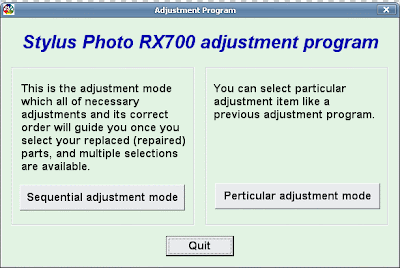
To run Adjustment Program for Epson RX700 require no date setting. but if You see error message "This program cannot be used" set date setting in your computer to "May 10, 2005" and delete adjustment program folder in system drive, usually in drive C. And don't forget to delete registry key "HKEY_LOCAL_MACHINE\SOFTWARE\EPSON\PTSG\" before re-run the software.


Follow this steps to Reset Waste Ink counter in The Epson stylus Photo RX700 using the adjusment program:
  • Download the software and extrac, then go to extracted folder.
  • Run by clicking "AdjProg.exe"
  • Click "paticular adjustment mode" - Ok
  • Set port and destination
  • double click Click consumable maintenance counter
  • Click check the Initialization button
  • Turn off printer and then turn on again
Download Adjustment Program for Epson RX700
READ MORE - Adjustment Program Epson RX700

Reset counter EPSON STYLUS C63, C64, C65, C66

Reset counter epson C63, C64, C65 and epson C66 using adjustment program and SSC service utility ver 4.30.


Resetting using adjustment program:

  1. Run adjustment software by clicking “APSC6364_Ver16.exe”
  2. Set model name and port, Ok
  3. Click maintenance tab
  4. Check waste ink pad counter
  5. Click reset
Resetting using SSC serve ver 4.30
  • Run SSC serve software
  • Set printer model setting in ssc serve to C63/C64/C65/C66 the close the setting
  • Right click ssc icon in system tray, select protections counter, select reset protection c counter.
  • Clcik Yes
Download Adjustment Program Epson Stylus C63 , C64
Download SSCLG Software/SSCServe resetter for almost all epson printers
READ MORE - Reset counter EPSON STYLUS C63, C64, C65, C66

Reset counter Epson Stylus C80

There two way to Reset counter Epson Stylus C80, are: Reset Manual and using drtool software


Manual reset

  • Hold down both the paper and ink buttons while you turn on the power.
  • When the paper out LED is just flashing release both buttons and press and hold the inkcleaning button for at least 10 seconds.
  • The printer will cycle through and self check for about 3 minutes and then function normally.
Using DRTool
  • Run DRTool software
  • Set printer model to C80
  • Click reset protection counter
Download link :

Download DRtool software
READ MORE - Reset counter Epson Stylus C80

Adjustment Program Epson Stylus C82

Adjustment Program Epson Stylus C82 no date setting requires to run this software.


Reset counter in epson c82 using adjustment C82:

  • Turn on the printer the Run the software
  • Select particular adjustment mode, then set the setting.
  • Select waste ink pad counter, Click Ok
  • Click initialize button, the printer shoul be reset.
Download Adjustment Program Epson Stylus C82
READ MORE - Adjustment Program Epson Stylus C82

Resetter Epson R340 And R350

Date setting for adjustent program is 20 februari 2007. You must change date setting in your computer before run software/adjustment program epson r340 and R350.


Here how to reset counter in epson R340 and R350

  • Start with printer on and installed corectly in the coumputer.
  • Run the software and click accept
  • Set the setting of adjustment and equal to the printer, Ok
  • Click maintenance tab.
  • Select waste ink pad counter
  • Click reset to reset counter to zero.
Download Adjustment Program Epson R340, R350
READ MORE - Resetter Epson R340 And R350

Digital Revolusion Tool

Digital Revolusion Tool (DR Tool) software resetter for epson printer but does not support for newest epson printer. If you have old epson printer with this tool You can reset the chip on your EPSON printer cartridge and thus print again even when the software tells you your ink has ran out.


There five functions in DR Tool, are:

  1. Head Cleaning, cleaning cartridge head.
  2. Protection Counter, reset protections counter.
  3. CSIC Functions, reset chips on cartridge.
  4. Ink Counter Functions, reset ink counter.
  5. Hot Swap.
This tool work work under Win98, Win ME, Win 2000 and Windows XP and no require instalations.

Download DRtool software
READ MORE - Digital Revolusion Tool

Adjustment Program Epson Stylus C83, C84, C85, C86

Adjustment Program Epson Stylus C83, C84, C85, C86 no require date settingbe altered in the computer.


Resetting waste ink counter in the epson C83, C84, C85, C86 using this adjustment:

  1. Run adjustment program
  2. Select model name and printer port
  3. Click maintenance tab
  4. Check waste ink pad counter
  5. Click reset
Download Adjustment Program Epson Stylus C83, C84, C85, C86
READ MORE - Adjustment Program Epson Stylus C83, C84, C85, C86

Adjustment Program EPSON STYLUS C87, C88, D88

Date setting for Adjustment Program Epson C87, C88 and D88 is 5 December 2005. This setting require to run adjustment without error and prevent messege “ this program cannot use because it expired”.


Here how to Reset waste ink counter Using Adjustment Program Epson C87, C88 and D88

  • Turn on the printer
  • run the software and click Accept
  • set the adjustment, Ok
  • select waste ink pad counter, OK
  • Click initialization button, Ok
Download Adjustment Program Epson C87, C88, D88
READ MORE - Adjustment Program EPSON STYLUS C87, C88, D88

Adjustment Program EPSON CX3500, CX3600, CX3650, CX4500, CX4600

Adjustment Program EPSON CX3500, CX3600, CX3650, CX4500, CX4600 no require date setting. So don’t worry to there error message when running this software.


Reset Ink Counter Epson CX3500, CX3600, CX3650, CX4500, CX4600 using this adjustment program

  • Run the software and click particular adjustment mode
  • Set adjustment setting and equal to the printer
  • Select waste ink pad counter
  • Click initialization
Download Adjustment Program Epson CX3500, CX3600, CX3650, CX4500, CX4600
READ MORE - Adjustment Program EPSON CX3500, CX3600, CX3650, CX4500, CX4600

Adjustment Program Epson CX4100, CX4200, CX4700, CX4800, DX4200, DX4250, DX4800, DX4850

This resetter require date setting to run without error. 17 january 2006 is date setting for Adjustment Program Epson CX4100, CX4200, CX4700, CX4800, DX4200, DX4250, DX4800, DX4850.


Resetting Ink Counter Pad Using this Adjustment Program

  1. set date setting in your Computer to 17 januari 2006,
  2. Run adjustment program then click accept
  3. Set the adjustment setting and equal to the printer.
  4. Select Waste ink pad counter and double‐click to execute it
  5. Then Click [Initialization] to reset the protection counter to the initial value.
Download Adjustment Program Epson CX4100, CX4200, CX4700, CX4800, DX4200, DX4250, DX4800, DX4850
READ MORE - Adjustment Program Epson CX4100, CX4200, CX4700, CX4800, DX4200, DX4250, DX4800, DX4850

Resetter Epson R300 and R310

I find three ways to reset Epson R300 and R310 are, using adjustment program, manual reset and using SSC serve. Before reset the printer your printer installed correctly in the computer except for manual reset.


Reset manual Epson Stylus Photo R300/R310

  • Turn on power.
  • Press and hold STOP, MANITENANCE and POWER buttons
  • Then turn off the power when prompted.
Reset Epson Stylus Photo R300/R310 using adjustment program

This adjustment no require date setting. Run and Set the adjustment setting and equal to the printer, Ok
  • Click maintenance tab
  • Select waste ink pad counter
  • Click reset
Resetting Using SSC software
  • Run and Set printer model to “Epson Stylus Photo R300/R310”
  • Right click tray SSC icon, select protection counter the reset protection counter.
  • OK.
Download Adjustment Program Epson R300 - R310
Download SSCLG Software/SSCServe resetter for almost all epson printers
READ MORE - Resetter Epson R300 and R310

Reset Counter Epson RX600, RX620 and RX630


Resetting RX600, RX620 and RX630 using adjustment program and manual reset. Adjustment Program RX600, RX620 and RX630 work under win98, WinME, Win 2K and Windows XP. This adjustment does not require date setting.

Resetting Counter on Epson RX600, RX620 and RX630 Using this Adjustment Program

  • Run the software and Set the adjustment setting and equal to the printer, Click Ok
  • Click maintenante tab
  • Check waste ink pad counter then click reset to reset the counter.
Manual resetting Epson RX600, RX620 and RX630
  • Press all following buttons : Power, B&W, Color,
  • Then, on demand (you'll see message on printer screen), turn off printer.
Download Adjustment Program Epson RX600, RX6 2 0, RX630
READ MORE - Reset Counter Epson RX600, RX620 and RX630

Adjustment Program/Software Resetter Epson R800, Epson R1800 and Epson R2400

Adjustment program for Epson R800, Epson R1800 and Epson R2400. This software can be used without change date setting in the computer.


Reset Waste Ink Counter using this adjustment program

  1. Run the software and click particular adjustment mode
  2. Select printer port
  3. Select waste ink pad counter
  4. Click initialization
Dont’t forget to setup refurbishment tool. The refurbishment function performs the below function.
  1. Ink discharge.
  2. Transportation liquid charge.
  3. EEPROM shipment setting.
Download Adjustment Program Epson Photo R800
Download Adjustment Program Epson R1800
Download Adjustment Program Epson R2400
READ MORE - Adjustment Program/Software Resetter Epson R800, Epson R1800 and Epson R2400

Wednesday, March 11, 2009

R290 Reseter

Hello everyone,


A lot of people are asking about this reseter. After searching for quite sometime here is a working copy provided by one of our members, manny_chengjr from Philippines. Thanks guys for all the support and please continue to help the group grow by sharing your knowledge and the reseters that you have.

Here is the link, in the meantime we uploaded it in divshare.

download ..


and mediafire :

download ..


source : http://www.indoreset.blogspot.com/
READ MORE - R290 Reseter

C110, CX7300, CX8300 & CX9300F Adjustment Program

Assalamu'alaikum ...

Here are new sets of reseters shared to us by another member "e2500e". Many thanks to you guys who are very supportive and generous in our group.

We were able to test the C110 reseter with an actual printer and it's working. All others were not tested with an actual printer but the good news is, the program itself is working even without the printer unlike other copies that are circulating in the net in which we are stuck in particular mode.

Good luck to everyone who needs these reseters.
Epson C110 Adjustment

download >>


Epson CX7300 Adjustment

download >>


Epson CX8300 Adjustment

download ...


Epson CX9300F Adjustment

download ...


READ MORE - C110, CX7300, CX8300 & CX9300F Adjustment Program

CX6900F adjustment program

Hi everyone,


Here is the link for the newest reseter brought to us by indoreset yahoo group. Thanks to manny_chengjr of Philippines for the said reseter. He is very generous in sharing to the group.

Epson CX6900f adjustment
http://www.mediafire.com/?1xjyjmxnjdt

Happy reseting!

sumber : http://www.indoreset.blogspot.com/


READ MORE - CX6900F adjustment program

Ikut Aku - Aku Ikut

SPONSOR

  ©Template Blogger Elegance by Dicas Blogger.

TOPO